Upgrade Home Wi-Fi for Smart Devices: 200 Mbps Across Your Residence
Anúncios
Upgrading your home Wi-Fi to achieve 200 Mbps speeds across your entire residence for smart devices involves a comprehensive strategy encompassing router upgrades, mesh systems, and optimal placement to ensure robust and reliable connectivity.
In today’s interconnected world, a robust and reliable home Wi-Fi network is no longer a luxury but a necessity, especially when you are looking to seriously upgrade home Wi-Fi to support an increasing array of smart devices. Achieving consistent 200 Mbps speeds throughout your entire residence ensures that everything from streaming 4K content to managing smart thermostats operates flawlessly. This guide provides practical solutions to transform your home network into a high-performance hub capable of handling all your smart living demands.
Anúncios
Understanding Your Current Wi-Fi Landscape
Before embarking on any upgrade, it is crucial to thoroughly assess your existing Wi-Fi setup. Many homeowners overlook the foundational elements of their network, leading to suboptimal performance even with seemingly powerful equipment. Understanding your current speeds, coverage gaps, and potential interference sources is the first step towards a truly effective upgrade.
Start by identifying your internet service provider (ISP) plan. While you might be paying for 200 Mbps or more, your current equipment might not be delivering that speed consistently throughout your home. Perform speed tests in various locations, not just near your router, to pinpoint dead zones or areas with significantly reduced speeds. This diagnostic approach provides a clear picture of where improvements are most needed.
Anúncios
Evaluating Your Router’s Age and Capabilities
The router is the heart of your home network, and its age and specifications play a pivotal role in overall performance. Older routers often lack the processing power and wireless standards required for modern smart homes.
- Wireless Standards: Look for routers supporting Wi-Fi 5 (802.11ac) or, ideally, Wi-Fi 6 (802.11ax) for future-proofing and better performance with multiple devices.
- Processor and RAM: Higher-end routers feature more powerful processors and ample RAM, enabling them to handle more simultaneous connections and data streams without bogging down.
- Antenna Configuration: Routers with multiple external antennas often provide better signal strength and coverage compared to those with internal antennas, especially in larger homes.
Consider the number of smart devices you currently own and plan to acquire. Each device adds to the network’s load, demanding bandwidth and processing power from your router. A comprehensive understanding of your current network’s limitations will guide your upgrade decisions effectively.
The Foundation: Choosing the Right Router
Selecting the appropriate router is arguably the most critical decision when aiming for 200 Mbps speeds across your entire home. The market is flooded with options, but not all are created equal, particularly when catering to a smart device-dense environment. Focus on modern standards, robust processing, and features designed for extensive coverage.
For achieving 200 Mbps consistently, a router supporting at least Wi-Fi 5 (802.11ac) is a minimum requirement, but Wi-Fi 6 (802.11ax) offers significant advantages. Wi-Fi 6 is designed to handle more devices simultaneously with greater efficiency, a crucial factor for smart homes. It utilizes technologies like OFDMA (Orthogonal Frequency-Division Multiple Access) and MU-MIMO (Multi-User, Multiple-Input, Multiple-Output) to improve performance in congested network environments, ensuring each smart device gets its fair share of bandwidth.
Key Router Features for Optimal Performance
Beyond the wireless standard, several features contribute to a router’s ability to deliver high speeds and reliable coverage.
- Dual-Band or Tri-Band: Dual-band routers operate on 2.4 GHz and 5 GHz frequencies. Tri-band routers add an extra 5 GHz band, which can be dedicated to specific devices or used for backhaul in mesh systems, significantly reducing congestion.
- Gigabit Ethernet Ports: Ensure your router has Gigabit Ethernet ports (10/100/1000 Mbps) for wired connections. This is essential for connecting devices like smart hubs, gaming consoles, or PCs directly to the network without creating a bottleneck.
- Quality of Service (QoS): QoS features allow you to prioritize certain types of traffic or specific devices. For example, you can prioritize video streaming or smart home commands to ensure they receive adequate bandwidth, even when other devices are active.
Investing in a high-quality router is an investment in your home’s digital infrastructure. It ensures that your smart devices communicate efficiently, providing the seamless, responsive experience you expect. Don’t compromise on this foundational component; it dictates the performance ceiling for your entire network.
Mesh Wi-Fi Systems: The Ultimate Coverage Solution
For larger homes or those with architectural challenges like thick walls, a single router often struggles to provide uniform 200 Mbps speeds. This is where mesh Wi-Fi systems become invaluable. Mesh systems use multiple access points (nodes) that work together to create a single, unified Wi-Fi network, eliminating dead zones and ensuring consistent coverage.
Unlike traditional range extenders that often halve bandwidth, mesh nodes communicate with each other to optimize signal paths and maintain high speeds. When you move around your home, your devices automatically switch to the strongest signal without interruption, a feature known as seamless roaming. This is particularly beneficial for smart devices that rely on a constant connection, such as security cameras or voice assistants.
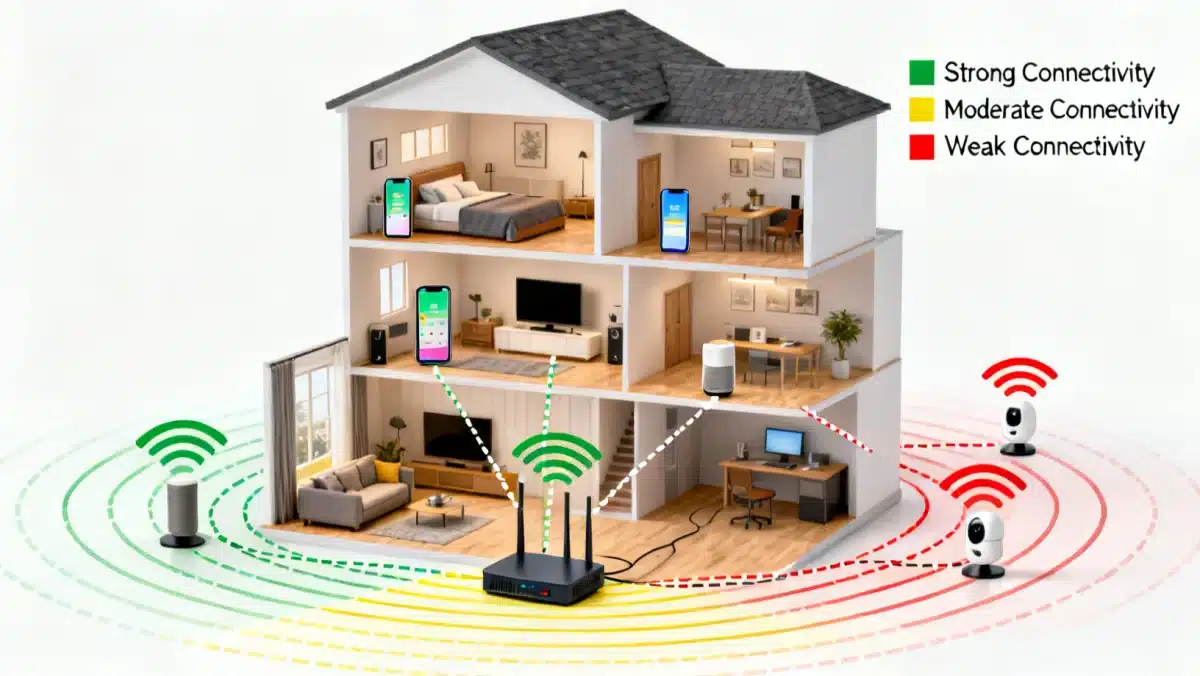
Most mesh systems are designed for easy setup via a smartphone app, guiding you through the placement of each node for optimal performance. Many also include advanced features like parental controls, guest networks, and robust security protocols, making them a comprehensive solution for modern smart homes.
Advantages of Mesh Wi-Fi for Smart Devices
- Whole-Home Coverage: Eliminates dead zones, ensuring every corner of your residence receives a strong Wi-Fi signal.
- Scalability: Easily expand your network by adding more nodes if you move to a larger home or acquire more smart devices.
- Dedicated Backhaul: Some mesh systems feature a dedicated wireless band for communication between nodes, preventing network congestion and maintaining high speeds for client devices.
A mesh Wi-Fi system is a powerful tool for achieving consistent 200 Mbps speeds throughout your entire home, especially when supporting a multitude of smart devices. It provides the necessary infrastructure for a truly connected and responsive smart living experience, making it a top recommendation for comprehensive Wi-Fi upgrades.
Optimizing Router and Node Placement
Even with the best equipment, poor placement can significantly degrade Wi-Fi performance. Strategic positioning of your router and any mesh nodes is crucial for maximizing signal strength and achieving those desired 200 Mbps speeds across your entire residence. Consider the physical layout of your home, potential obstructions, and sources of interference.
Your main router should ideally be placed in a central location within your home, away from walls, large metal objects, and appliances that emit electromagnetic interference, such as microwaves or cordless phones. Elevating the router, perhaps on a shelf, can also help the signal propagate more effectively. Avoid placing it in a cabinet or behind a TV, as these can act as signal blockers.
Best Practices for Node Placement in a Mesh System
For mesh systems, the placement of individual nodes is just as important as the main router. They need to be close enough to each other to maintain a strong connection, but far enough apart to extend coverage effectively.
- Line of Sight: Try to maintain a clear line of sight between nodes where possible.
- Mid-Point Placement: Place nodes roughly midway between the main router and the areas where you need improved coverage.
- Avoid Obstructions: Just like the main router, keep nodes away from major obstructions and interference sources.
Many mesh systems come with companion apps that assist with node placement, often providing visual cues or signal strength indicators to help you find the optimal spots. Experiment with different locations to find the configuration that provides the best overall coverage and speed. Proper placement can dramatically improve your network’s efficiency without requiring additional hardware.
Leveraging Ethernet Backhaul and Powerline Adapters
While wireless connectivity is convenient, sometimes a wired connection is simply superior for performance and reliability. For areas where Wi-Fi signals struggle, or for devices that demand maximum bandwidth, leveraging Ethernet backhaul or powerline adapters can be a game-changer in achieving consistent 200 Mbps speeds.
Ethernet backhaul involves connecting your mesh nodes to each other, or to the main router, using Ethernet cables. This creates a dedicated, high-speed connection between the nodes, freeing up wireless bandwidth for your client devices. If your home is pre-wired with Ethernet, or if you can run cables discreetly, this is often the most effective way to ensure optimal performance, especially for nodes furthest from the main router. Dedicated backhaul significantly reduces latency and increases throughput, making your entire mesh network more efficient.
Powerline Adapters for Difficult-to-Wire Areas
For homes where running Ethernet cables is impractical, powerline adapters offer a viable alternative. These devices use your home’s existing electrical wiring to transmit network data. You plug one adapter into an electrical outlet near your router and connect it via an Ethernet cable. Another adapter is plugged into an outlet in a different room, and it broadcasts Wi-Fi or provides an Ethernet port for local devices.
While powerline speeds can vary depending on the quality of your electrical wiring, modern adapters can often deliver speeds well over 200 Mbps, making them an excellent solution for extending network reach to challenging areas. They are particularly useful for connecting stationary devices like smart TVs, gaming consoles, or desktop PCs that benefit from a stable, high-speed connection.
Combining the flexibility of wireless mesh networks with the reliability of wired connections, whether through Ethernet backhaul or powerline adapters, creates a hybrid system that maximizes your chances of achieving pervasive 200 Mbps speeds. This approach ensures that even the most demanding smart devices have the bandwidth they need to operate seamlessly.
Advanced Settings and Maintenance for Sustained Performance
Beyond hardware upgrades and strategic placement, fine-tuning your router’s software settings and performing regular maintenance are critical for sustaining 200 Mbps speeds and ensuring optimal performance for your smart devices. Many routers offer advanced configurations that can significantly impact network efficiency and security, often overlooked by average users.
One key area to explore is your router’s channel selection. Wi-Fi operates on various channels, and if your router is on the same channel as your neighbors’, you might experience interference and slower speeds. Most modern routers offer automatic channel selection, but sometimes manually choosing a less congested channel (especially on the 2.4 GHz band) can yield noticeable improvements. Tools are available to scan for Wi-Fi networks in your area and identify the least crowded channels.
Firmware Updates and Network Security
Regularly updating your router’s firmware is paramount. Firmware updates often include performance enhancements, bug fixes, and crucial security patches that protect your network from vulnerabilities. Neglecting firmware updates can expose your smart devices and personal data to risks.
- Automated Updates: Check if your router supports automatic firmware updates and enable this feature if available.
- Manual Updates: If not, periodically visit your router manufacturer’s website to download and install the latest firmware.
- Strong Passwords: Always use strong, unique passwords for your Wi-Fi network and router administration interface.
Implementing WPA3 encryption, if your router supports it, provides the strongest available security. Additionally, consider enabling a guest network for visitors or less trusted smart devices. This segregates them from your main network, enhancing security and potentially improving main network performance. Regular reboots of your router can also help clear its memory and improve performance, much like restarting a computer. By actively managing these aspects, you ensure your home Wi-Fi remains fast, secure, and ready for all your smart living needs.
Future-Proofing Your Smart Home Network
As smart home technology continues to evolve rapidly, future-proofing your Wi-Fi network ensures it remains capable of handling new devices and higher bandwidth demands without constant overhauls. Thinking ahead in your upgrade strategy can save you time and money in the long run, guaranteeing your home network stays ahead of the curve.
One of the most significant steps in future-proofing is investing in Wi-Fi 6 (802.11ax) or even Wi-Fi 6E capable hardware. While Wi-Fi 6 offers substantial improvements in handling multiple devices and network congestion, Wi-Fi 6E introduces a new 6 GHz band. This band is less congested than the 2.4 GHz and 5 GHz bands, offering faster speeds and lower latency for compatible devices. Although most smart devices currently don’t support 6E, having a router that does positions you well for future advancements.
Considering Emerging Technologies and Standards
Beyond Wi-Fi standards, keep an eye on other networking technologies that might integrate with or enhance your Wi-Fi setup. For instance, some smart home platforms are moving towards Thread or Matter, which aim to unify smart device communication. While these are distinct from Wi-Fi, a robust Wi-Fi network is still the backbone that connects your smart home to the internet and often facilitates the setup and management of these devices.
- Ethernet Wiring: If undertaking a home renovation, consider adding Ethernet wiring to key rooms. Wired connections are always more reliable and faster than wireless.
- Scalable Mesh Systems: Choose mesh systems that allow for easy expansion by adding more nodes as your home or device count grows.
- Cloud Integration: Many smart devices rely on cloud services. A strong, consistent internet connection, underpinned by excellent Wi-Fi, is vital for their responsiveness.
By adopting a forward-thinking approach, you can build a home network that not only meets your current needs for 200 Mbps speeds across your residence but also adapts gracefully to the smart home innovations yet to come. This proactive strategy ensures a consistently smooth and integrated smart living experience for years to come.
| Key Upgrade Component | Benefit for 200 Mbps & Smart Devices |
|---|---|
| Modern Router (Wi-Fi 6) | Handles more devices efficiently, provides higher throughput, and reduces congestion. |
| Mesh Wi-Fi System | Ensures whole-home coverage, eliminating dead zones and maintaining consistent speeds. |
| Optimal Placement | Maximizes signal strength and minimizes interference, crucial for reliable 200 Mbps. |
| Ethernet Backhaul/Powerline | Provides stable, high-speed wired connections for demanding devices or difficult areas. |
Frequently Asked Questions About Wi-Fi Upgrades
For a smart home aiming for 200 Mbps, Wi-Fi 6 (802.11ax) is the ideal standard. It’s designed to handle multiple devices more efficiently, offering higher speeds and better performance in congested network environments compared to older standards like Wi-Fi 5, ensuring smooth operation for all your smart gadgets.
A mesh Wi-Fi system uses multiple nodes to create a single, unified network, eliminating dead zones and providing consistent coverage throughout your home. This ensures that smart devices, regardless of their location, maintain a strong and stable connection, preventing interruptions and enhancing responsiveness.
Yes, router placement is critically important. Placing your router in a central, open location, away from obstructions like walls, metal objects, and interfering appliances, significantly improves signal strength and propagation. Optimal placement ensures maximum coverage and helps achieve desired speeds across your entire residence.
Powerline adapters can indeed help achieve 200 Mbps or more in areas where Wi-Fi struggles or running Ethernet cables is impractical. They utilize your home’s existing electrical wiring to transmit network data, providing a stable and often high-speed connection for devices in challenging locations, though performance can vary with wiring quality.
Key maintenance steps include regularly updating your router’s firmware for performance and security, choosing less congested Wi-Fi channels, using strong passwords, and enabling a guest network. Periodic reboots of your router can also clear its memory and improve overall network stability and speed.
Conclusion
Successfully upgrading your home Wi-Fi to achieve 200 Mbps speeds across your entire residence for smart devices is an achievable goal with the right strategy. By understanding your current network, investing in modern hardware like Wi-Fi 6 routers and mesh systems, optimizing placement, and leveraging wired solutions where appropriate, you can create a robust and future-proof network. Regular maintenance and attention to advanced settings will ensure sustained performance, providing a seamless and responsive smart living experience for years to come. Your smart home deserves nothing less than exceptional connectivity, and these practical solutions pave the way to achieving it.